Proxmox VE Arm64 Desteği Resmi Olarak Yayında: Sanallaştırma ARM'e Taşınıyor
Proxmox VE 9.2, ilk resmi Arm64 sürümüyle yayında. NVIDIA Grace Hopper ve Vera tam destekli; KVM, LXC, ZFS ve Ceph x86 ile birebir aynı. Detaylar, mimari farklar ve topluluk tepkileri burada.

Proxmox VE Arm64 Desteği Resmi Olarak Yayında: Sanallaştırma ARM'e Taşınıyor
Veri merkezleri enerji faturalarıyla boğuşurken ARM, sunucu dünyasının en hızlı büyüyen mimarisi haline geldi. Ancak sanallaştırma katmanı yıllarca x86'ya bağlı kaldı. 5 Ağustos 2026'da Proxmox bu duvarı yıktı: Proxmox Virtual Environment (VE) 9.2, ilk resmi Arm64 sürümüyle kullanıma sunuldu. Duyurunun detayları, desteklenen donanım, mimari farklar ve topluluğun ilk tepkileri aşağıda.
ARM Sunucuların Yükselişi ve Kapanan Boşluk
Son beş yılda ARM tabanlı sunucular, x86'ya ciddi bir alternatif olarak konumlandı. AWS'nin Graviton serisi, Ampere'nin Altra işlemcileri ve NVIDIA'nın Grace mimarisi, bulut sağlayıcıların ve veri merkezi operatörlerinin dikkatini bu yöne çevirdi. Bunun tek nedeni enerji tasarrufu değil; aynı güç bütçesinde çok daha fazla çekirdek çalıştırabilmek, yüksek bellek bant genişliği ve giderek olgunlaşan bir yazılım ekosistemi de cabası.
Eksik kalan parça, bu donanımın üzerinde çalışacak kurumsal sınıf bir sanallaştırma katmanıydı. Açık kaynak dünyasında Proxmox VE, 2 milyondan fazla host üzerinde çalışan en yaygın platformlardan biri. KVM, LXC, ZFS ve Ceph'i tek bir arayüzde birleştiren sistem, bugüne kadar yalnızca x86-64 mimarisini resmi olarak destekliyordu. ARM tarafında ise ya topluluk çatallarına ya da büyük bulut sağlayıcıların kapalı çözümlerine mahkumdunuz. Bu duyuru, o boşluğu kapatıyor.
Proxmox Neden Bu Noktaya Geldi?
Bu duyuruyu tam anlamak için Proxmox'un arka planına bakmakta fayda var. Proxmox Server Solutions, 2005 yılında Viyana'da kuruldu. Şirketin ürün felsefesi başından beri netti: açık kaynak kodlu, satıcı bağımsız, abonelikle desteklenen sunucu yazılımı. Proxmox VE, 2008'deki ilk kararlı sürümünden bu yana KVM tabanlı sanal makineleri ve LXC konteynerlerini tek panelde birleştirerek, ticari hipervizörlere masrafsız bir alternatif olarak büyüdü.
Bugün platform, dünya genelinde 2 milyondan fazla host üzerinde çalışıyor; topluluğun 225 binden fazla üyesi ve 3 bin entegrasyon ortağı var. Bu ölçek, Proxmox'u sadece homelab meraklılarının değil, regüle sektörlerin ve kamu bulutlarının da değerlendirdiği bir platform haline getirdi. Şirketin CTO'su Thomas Lamprecht ve COO'su Tim Marx, duyurularda öne çıkan iki isim. İkisinin de vurgusu aynı: ARM desteği bir yan proje değil, ana ürünün ikinci mimariye taşınması.
Proxmox VE 9.2 Arm64: Ne Değişti?
Proxmox'un resmi duyurusuna göre Arm64 sürümü, x86-64 karşılığıyla aynı kod tabanını, aynı paket depolarını ve aynı yayın döngüsünü paylaşıyor. Yani ayrı bir proje değil; aynı Proxmox VE'nin ikinci bir mimariye taşınmış hali. Sürüm, Debian 13.5 "Trixie" üzerine kurulu ve Linux kernel 7.0'ı kararlı varsayılan olarak kullanıyor. QEMU 11.0, LXC 7.0 ve ZFS 2.4 de x86-64 ile birebir aynı sürümlerde geliyor. Proxmox Backup Server ve diğer ürünler için de iç test sürümleri hazır durumda; kurumsal talep geldikçe önceliklendirilecekler.
En kritik vurgu tam özellik paritesi. KVM sanal makineleri, LXC konteynerleri, yazılım tanımlı ağ, yüksek kullanılabilirlik kümelemesi, yedekleme ve Ceph depolama yığını; hepsi ARM üzerinde x86'daki gibi çalışıyor. Proxmox ekibi, ZFS ve Ceph'in x86 dağıtımlarıyla birebir aynı performans, güvenilirlik ve özellik seviyesinde olduğunu özellikle belirtiyor. Bu, "ARM sürümü deneysel bir yan proje" diye düşünenler için net bir cevap niteliğinde.
Desteklenen Donanım: Grace, Vera ve Best-Effort Dünyası
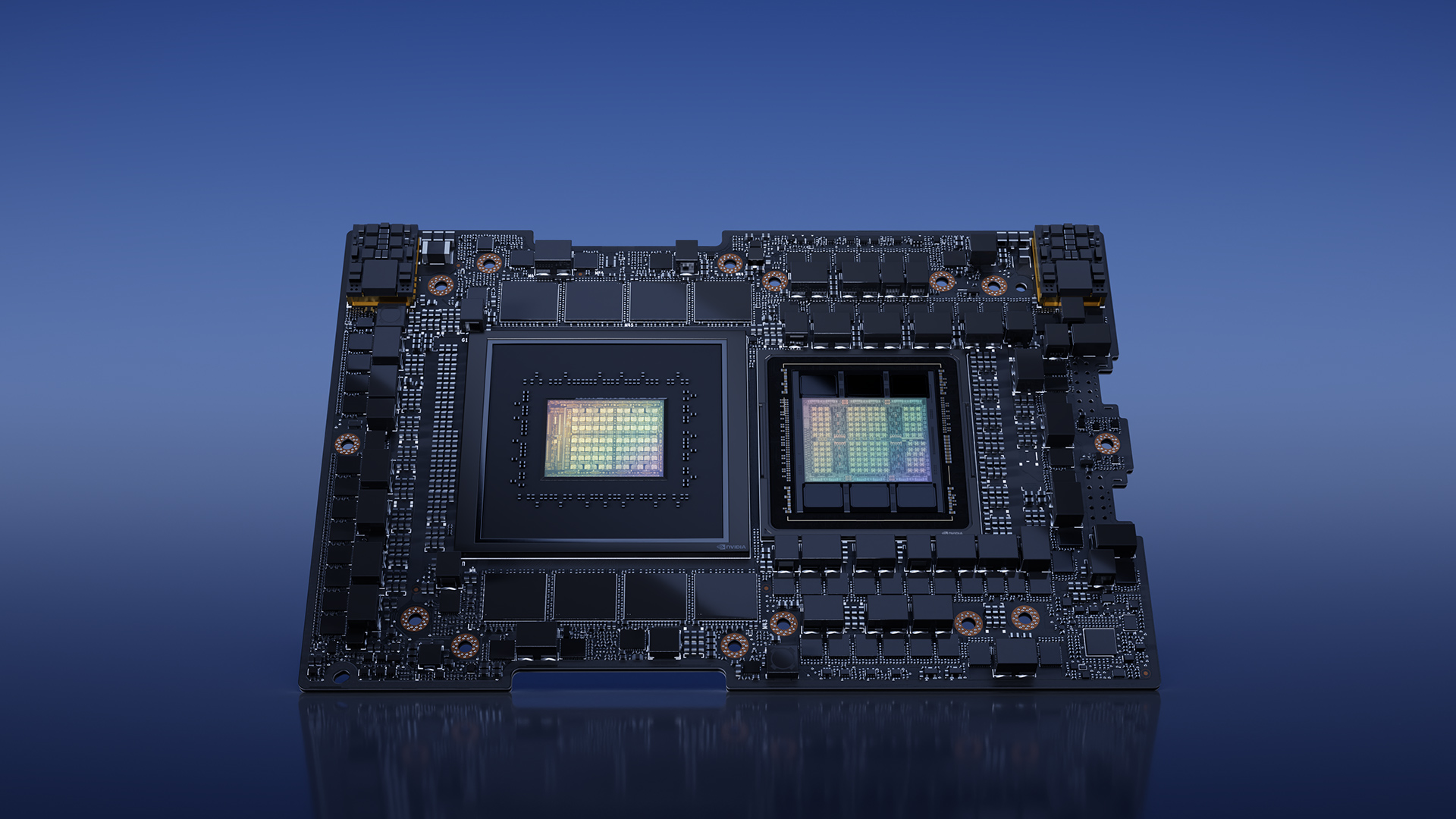
İlk sürümde tam destek listesi iki platformdan oluşuyor: NVIDIA Grace Hopper ve NVIDIA Vera. Her iki mimari de yoğun veri merkezi, bulut, hızlandırılmış hesaplama ve yapay zeka eğitim/çıkarım iş yüklerini hedefliyor. Proxmox mühendisleri bu portu NVIDIA ve Supermicro ile ortak yürüttü; Grace Hopper Superchip sistemlerinde yapılan validasyon çalışmaları sayesinde platform, yayınlandığı ilk günden itibaren üretim ortamlarında çalışıyor.
Diğer donanımlar için best-effort destek geçerli. UEFI tabanlı ARMv9-A veya daha yeni sunucular genel olarak çalışıyor; ARMv8-A sistemler de çoğunlukla destekleniyor. Kilit şart, ana makinenin UEFI ile açılması ve donanımını ACPI üzerinden tanımlaması. Device tree ile çalışan tek kartlı bilgisayarlar, yani Raspberry Pi ve benzerleri, resmi olarak desteklenmiyor.
Bu kısıt topluluğu durdurmadı. Jeff Geerling, 128 çekirdekli Ampere Altra Max sisteminde kurulumun çok kolay olduğunu yazdı. Forumda bazı kullanıcılar Raspberry Pi 4 ve Pi 5 üzerinde UEFI firmware projeleri (pftf/RPi4, rpi5-uefi) kullanarak Proxmox'u çalıştırmayı başardı. Resmi destek olmasa da sistemin mimarisi, istekli kullanıcılara kapıyı kapatmıyor.
Mimari Farklar: ARM'de Sanallaştırma Nasıl İşliyor?
Proxmox ekibi, x86'dan birebir taşınmayan parçaları dürüstçe listeleyen bir bölüm yayınladı. Bunlar kritik detaylar:
- Sanal makineler her zaman UEFI ile açılıyor. ARM için OVMF'nin AAVMF sürümü kullanılıyor; x86'daki SeaBIOS seçeneği ARM'de yok.
- Bazı güvenlik ve grafik özellikleri x86'ya özel. AMD SEV bellek şifrelemesi ve Intel GVT-g aracılı vGPU paylaşımı ARM sürümünde bulunmuyor.
- Mikrocode paketi yok. intel-microcode ve amd64-microcode gibi işletim sistemi seviyesindeki CPU mikrocode güncellemeleri ARM'de gerekmiyor.
- Konuklar mimarilerine bağlı. Bir konuk yalnızca kendi mimarisindeki düğümlerde çalışabiliyor; canlı geçiş (live migration) yalnızca aynı mimarideki düğümler arasında mümkün.
- Karma mimari kümeler resmi olarak desteklenmiyor. Teknik olarak engellenmemiş olsa da x86 ve ARM düğümlerini aynı kümede karıştırmak önerilmiyor. Mevcut bir konuğu ARM'e taşımak isterseniz, veriyi yedek/geri yükleme veya paylaşımlı depolama üzerinden taşıyıp konuğu yeni mimari için yeniden kurmanız gerekiyor.
Bu farklar, bir kısıtlama listesinden çok ARM ekosisteminin gerçekliğini yansıtıyor. x86'da yıllardır biriken firmware ve güvenlik katmanları ARM'de henüz o kadar katmanlı değil. Proxmox'un bunları şeffaf biçimde belgelemesi, kurumsal kullanıcıların sürpriz yaşamaması için doğru bir yaklaşım.
NVIDIA İş Birliği ve AI Fabrikaları
Bu duyuru, 28 Temmuz'da açıklanan bir iş birliğinin devamı. Proxmox VE, NVIDIA Mission Control ekosistemine katılarak AI fabrikalarının altyapı katmanını yöneteceğini duyurmuştu. NVIDIA Mission Control, Blackwell ve Vera Rubin platformlarında çalışan AI iş yükleri için geliştirici iş planlama, orkestrasyon ve otomatik kurtarma sunuyor; Proxmox VE de bu sistemin altındaki sanallaştırma katmanı olarak görev yapıyor. Kurumsal ortamlarda yerel yapay zeka altyapısı kurmak isteyenler için bu iş birliği, açık kaynak bir tabanın ne kadar ileri gidebileceğinin de göstergesi.
Yani Arm64 desteği, bir homelab meraklılarına jest değil; NVIDIA'nın önümüzdeki nesil veri merkezi stratejisinin parçası. Grace ve Vera mimarilerinin ilk günden tam desteklenmesi, NVIDIA'nın upstream çekirdek katkıları ile Proxmox'un yıllardır biriktirdiği kurumsal güvenilirlik itibarının birleşimi. Tim Marx'ın duyurudaki sözü durumu özetliyor: Müşteriler, x86'da alıştıkları kritik görev istikrarını Arm64'te de bekliyor ve Proxmox bunu teslim etmek için çalışıyor.
x86 vs ARM: Değişen Paradigma
Bu duyuru, sanallaştırma dünyasındaki denklemleri de değiştiriyor. Yıllarca "ARM enerji tasarrufu demek, x86 performans demek" ikilemi geçerliydi. NVIDIA Grace'in 72 ARM çekirdeği ve 480 GB'a kadar LPDDR5X belleği bu ayrımı bulanıklaştırıyor. AI iş yüklerinin büyük bölümü zaten GPU'da çalışıyor; CPU tarafındaki iş ise veri akışını yönetmek. ARM'in yüksek çekirdek yoğunluğu ve bellek bant genişliği, tam da bu iş yükü profiline uyuyor.
Yazılım tarafında da zincir tamamlanıyor. Ubuntu, Debian ve diğer büyük dağıtımlar ARM'i uzun süredir birinci sınıf vatandaş olarak görüyor. Depolama tarafında TrueNAS'ın ARM desteği de geçen yıl resmiyet kazandı. Proxmox'un bu tabloya eklenmesiyle ARM sunucu sahipleri artık "kendi çözümünü kendin kur" yaklaşımına mahkum değil. Enterprise düzeyinde desteklenen, düzenli güncellenen, yedeklemesi ve kümelemesi hazır bir platform var. NVIDIA'nın ARM tabanlı süperçip ailesini incelediğimiz yazıda bu dönüşümün sinyallerini daha önce görmüştük.
Elbette x86 hâlâ rakipsiz olduğu alanlara sahip: en geniş yazılım uyumluluğu, olgun firmware ekosistemi ve yılların operasyonel birikimi. ARM'in payı artsa da geçişin bir "ya hep ya hiç" meselesi olması beklenmiyor. Karma veri merkezleri, iş yüküne göre mimari seçen bir gelecek çok daha olası.
Topluluk Ne Diyor? Homelab'de ARM
Duyurunun en hareketli olduğu yerlerden biri homelab topluluğu. Yıllardır ARM mini bilgisayarlarında Proxmox çalıştırmak için çatallar ve yamalar kullanan kullanıcılar, resmi ISO'nun gelişini heyecanla karşıladı. Jeff Geerling'in Ampere Altra Max testinde kurulum akıcı; tek sorun, ARMv8 sistemde Ubuntu 24.04 kurulumu sırasında yaşadığı ve forumda raporladığı bir VM çökmesi. Bu da "ARMv9 tam destek, ARMv8 best-effort" politikasının gerçek bir yansıması.
Raspberry Pi tarafında ilginç bir durum var. Resmi destek olmasa da kullanıcılar UEFI firmware projeleriyle Pi 4 ve Pi 5 üzerinde Proxmox'u çalıştırmayı başardı. Bir kullanıcı, 4 çekirdekli Cortex-A72'li Pi 4'ünde pve-manager 9.2.9 ve kernel 7.0.14 çalıştıran sisteminin ekran görüntüsünü paylaştı. Bir diğeri, test laboratuvarını Raspberry Pi OS tabanlı eski pxvirt deposundan resmi Proxmox'a taşıdığını yazdı. "Resmi değil ama çalışıyor" cümlesi, ARM topluluğunda her zamankinden daha geçerli.

Küçük form faktörlü ARM cihazlar da ilgi görüyor: Minisforum MS-R1, Radxa Orion O6 ve Framework'ün ARM anakartı, bu sürümün homelab'de yayılması için doğal adaylar. Enerji verimliliği odaklı bu cihazların kullanıcı kitlesi, 24/7 çalışan sunucuların faturasını düşürmek isteyenlerden oluşuyor. Küçük dil modellerinin verimli çalıştırılması gibi uçta (edge) hesaplama konularıyla ilgilenenler, bu donanımları hem sanallaştırma hem de model çalıştırma için tek platformda birleştirebilir.
Kurulum ve Pratik Başlangıç
Denemek isteyenler için süreç, x86'dakinden farklı değil. Proxmox'un indirme sayfasından Arm64 ISO'sunu alıp USB belleğe yazdırıyorsunuz; grafik kurulum sihirbazı, disk bölümlemeden ağ yapılandırmasına kadar adımları aynı şekilde götürüyor. UEFI/ACPI destekli bir ARM sunucunuz varsa kurulum, Jeff Geerling'in deneyiminde olduğu gibi tek seferde tamamlanıyor. Zaten Debian 13 "Trixie" çalışan bir ARM sisteminiz varsa, Proxmox VE'yi x86'dakiyle aynı prosedürle mevcut Debian üzerine de kurabilirsiniz.
Kurulum sonrası ilk iş, enterprise deposuna geçmek veya ücretsiz no-subscription deposunu kullanmak. Arm64 için pve-enterprise deposu mevcut; abonelik sahibi olmayanlar için no-subscription deposu da x86'daki gibi çalışıyor. Konuk işletim sistemi tarafında Ubuntu, Debian ve diğer ARM sürümlerini içe aktarabilir, mevcut qcow2 imajlarını paylaşımlı depolama üzerinden taşıyabilirsiniz. Topluluktan bir kullanıcı, Minisforum MS-R1 makinesine kurduğu Proxmox'a mevcut ARM VM imajlarını import edip sorunsuz çalıştırdığını aktardı.
Bu Sürüm Kimin İşine Yarar?
Peki bu gelişme kimler için anlamlı? İlk sırada, ARM tabanlı altyapıya geçmeyi planlayan kurumlar var. Bulut sağlayıcılarının Graviton ve Grace tabanlı örnek tipleri yaygınlaştıkça, kendi veri merkezinde benzer verimliliği yakalamak isteyen şirketler için Proxmox VE artık meşru bir seçenek. NVIDIA donanımına yatırım yapan AI ekipleri, hipervizör seçimini yaparken "hangi mimari destekleniyor" sorusunu sormak zorunda kalmayacak.
İkinci grup, enerji maliyetlerini düşürmek isteyen homelab kullanıcıları. ARM mini sunucular, aynı iş yükünü x86 masaüstü donanımından çok daha az watt ile çalıştırıyor. Üçüncü grup ise açık kaynak ekosistemi takip eden mühendisler: Proxmox'un ARM portu, QEMU ve KVM'nin ARM üzerinde ne kadar olgunlaştığının canlı bir kanıtı. Bu üç kitlenin kesişimi, sürümün yayılma hızını belirleyecek.
Sırada Ne Var?
Proxmox'un yol haritası net: Daha fazla donanım satıcısıyla görüşmeler sürüyor ve desteklenen platform listesinin genişlemesi bekleniyor. Forumda kurumsal kullanıcılar, HPE gibi satıcıların ARM sistemleri için destek isteyip istemeyeceğini soruyor. Proxmox Backup Server'ın iç test sürümleri hazır; hangi ürünün öncelikli taşınacağına kurumsal talepler karar verecek.
Abonelik tarafında düzen oturmuş durumda. pve-enterprise deposu ARM için de mevcut ve x86'dakiyle aynı servis seviyesinde kurumsal destek sunuluyor. ARM abonelikleri x86'dan ayrı ve şu an talep üzerine satış ekibi üzerinden alınabiliyor. Yani ARM'e geçmek isteyen bir kurum, desteği olmayan bir yazılıma yatırım yapmış olmuyor.
Sonuç
Proxmox VE'nin Arm64 desteği, bir yazılım sürümünden fazlası. ARM sunucuların kurumsal sınıf sanallaştırmaya kavuşması, veri merkezi mimarilerinin geleceğini şekillendiren bir kilometre taşı. NVIDIA ile kurulan derin iş birliği, AI fabrikalarının altyapısını açık kaynak bir platforma emanet ediyor; ZFS ve Ceph gibi depolama yığınlarının tam pariteyle taşınması, ikinci sınıf vatandaş kaygısını ortadan kaldırıyor.
ARM tarafında sanallaştırma denemek istiyorsanız, doğru zaman. Resmi ISO'yu indirip bir Grace Hopper ya da UEFI destekli herhangi bir ARM sunucuda deneyebilirsiniz. Homelab'deyseniz ve Raspberry Pi'de ısrar ediyorsanız, UEFI firmware projeleriyle yolu açabilirsiniz; ama asıl potansiyel kurumsal ARM donanımında. Düşüncelerinizi yorumlarda paylaşın, hangi donanımda denediğinizi merak ediyoruz.
Yazar

Efe Özkan
Yapay Zeka ve Yazılım Geliştirici